
How to Send an Instagram Reel on WhatsApp as a Real Video
You share a Reel to WhatsApp and it lands as a grey card with a title and no thumbnail. Tapping it kicks the other person out to Instagram, where they may hit a login wall. Here's why WhatsApp behaves this way and how to send the video itself instead.
WhatsApp never plays a linked video
This is the part most guides get wrong. WhatsApp isn't failing to load your Reel — it was never going to play it. Links in WhatsApp only ever become a preview card: a title, a description, and a thumbnail scraped from the page's Open Graph tags. There is no inline player for links, on any platform, by design.
On top of that, Instagram gates Reel pages behind a login for anonymous visitors, so the metadata WhatsApp scrapes is often empty. That's why you frequently get a card with no image at all — a blank rectangle.
So the goal isn't to fix the link. It's to stop sending a link. WhatsApp plays video the moment it's an attached file, and only then.
Worth knowing: this is where WhatsApp and Telegram genuinely differ. Telegram will render a player for a direct video URL, so there you can stay link-based — see Reels to Telegram. For WhatsApp you need the file.
Step by step
Android
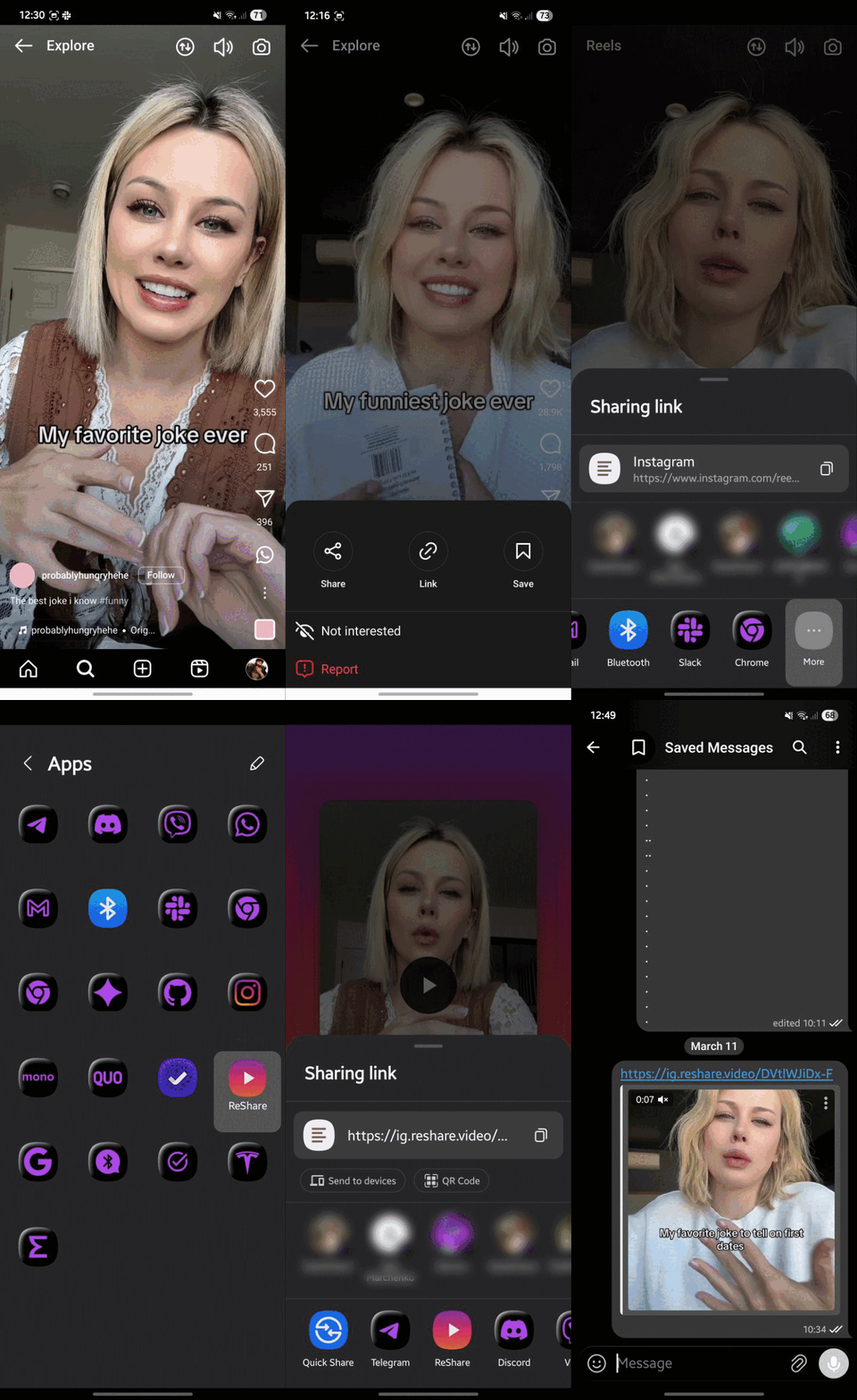
- Open reshare.video in Chrome, tap menu → Add to Home screen → Install (once)
- In Instagram, open the Reel → Share → ReShare
- Tap Download to device
- In WhatsApp, open the chat → attachment icon → Gallery → pick the video
iPhone
- Add the ReShare Shortcut
- Open the Reel → Share → More → ReShare
- Save the video, then attach it from Photos in WhatsApp
Desktop
Drag the ReShare bookmarklet from the homepage to your bookmarks bar, click it on any Reel page, download the file, then drag it straight into a WhatsApp Web chat.
Keep the quality
WhatsApp re-compresses anything sent through Gallery. If the Reel is text-heavy or detailed and you want it to arrive untouched, attach it as Document instead — WhatsApp transfers documents byte-for-byte. The tradeoff is that it shows as a file row rather than a playable bubble, so use it only when quality matters more than convenience.
Questions
Does this work for private accounts?
No. Only publicly viewable Reels can be extracted. Private and follower-only posts aren't reachable without your login, and ReShare never asks for one.
Is there a watermark?
No. ReShare hands you the original file Instagram already serves — nothing is re-encoded and nothing is stamped on it.
Is there a size limit?
WhatsApp allows up to 2 GB per attachment. Reels max out at 90 seconds, so you'll never come close.
Can I send it to a WhatsApp Status or Group?
Yes. Once the video is in your gallery it behaves like any other clip — Status, groups, broadcasts, all the same.