
Instagram Reel Not Playing in Telegram? Here's Why — and the Fix
You paste a Reel link into a Telegram chat and get a bare blue link, or a thumbnail nobody can tap. The other person has to leave Telegram, open Instagram, maybe log in. This page explains what's actually going wrong and how to send a Reel that plays right there in the chat.
Why the link doesn't preview
Telegram doesn't guess at links. When you send one, Telegram's server fetches that page itself and looks for Open Graph tags — specifically og:video, which tells it "here is a playable file." If it finds one, it builds a native player in the chat bubble.
Instagram doesn't give it one. Reel pages are gated behind a login for anonymous visitors, and what Instagram serves to a non-authenticated fetcher like Telegram's crawler contains no usable og:video. Telegram asks, gets nothing playable, and falls back to plain text. Nothing is broken on your end — there's simply no video for Telegram to find.
The workarounds you'll see suggested don't hold up. Rewriting instagram.com to a mirror domain depends on third-party proxies that break constantly. Screen recording costs you quality and adds your own UI to the frame. Downloading and re-uploading works, but that's four steps and a file sitting in your gallery.
What actually works: send the video file, not the page
Telegram does render a player for a direct video URL — one that ends in the actual media file rather than an HTML page. The MIME type is unambiguous, so there's nothing to negotiate and no Open Graph lookup needed.
That's the whole trick. Instagram already serves the Reel from its own CDN as a plain video file; it's just buried in the page. Extract that URL and hand it to Telegram, and the video plays inline. No re-encoding, no watermark, no quality loss — it's the same file Instagram would have played.
Step by step
Android — 2 taps, no copy-paste
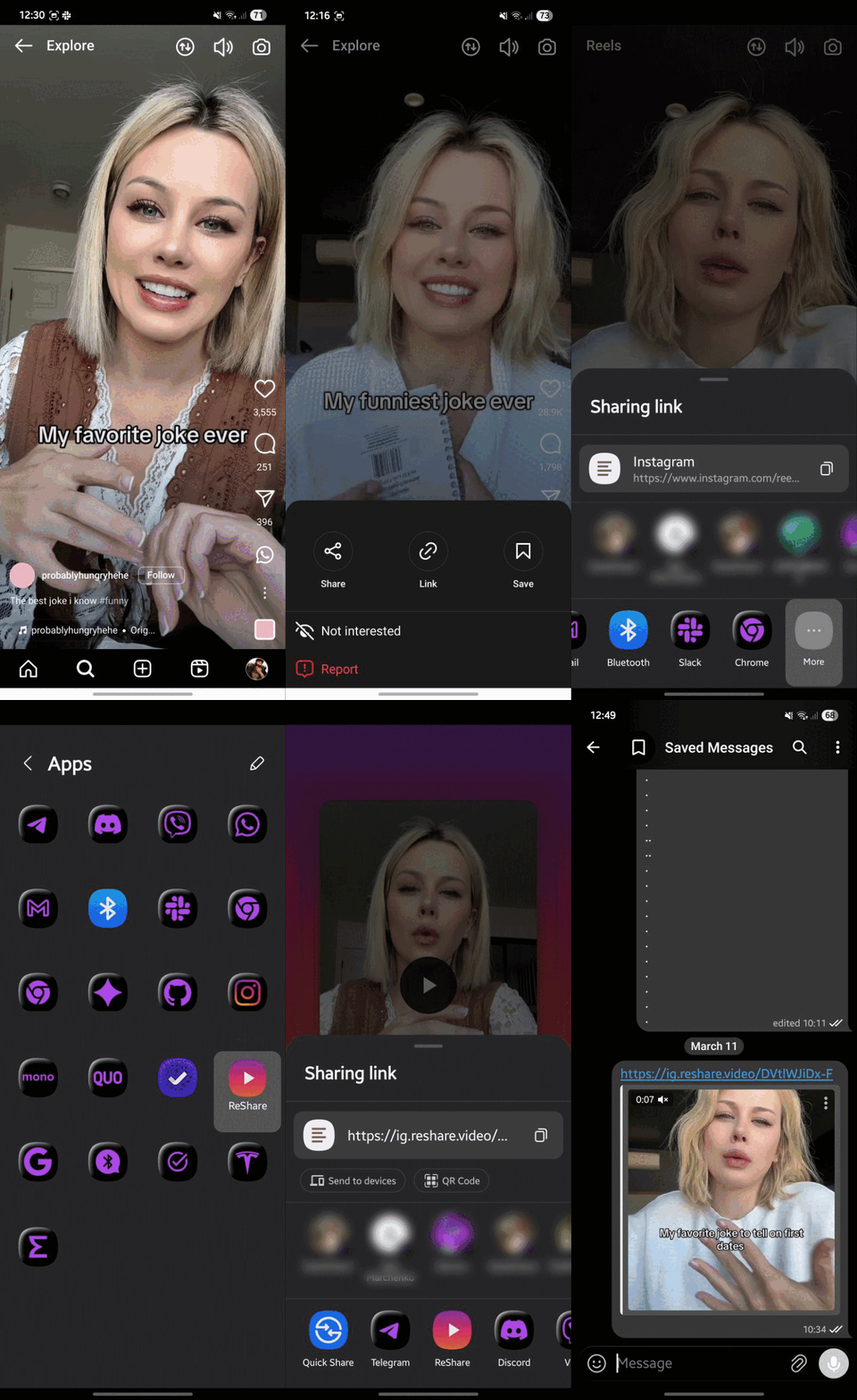
Install ReShare as an app once and it shows up in Android's own Share menu, so you never touch a URL.
- Open reshare.video in Chrome, tap menu → Add to Home screen → Install
- In Instagram, open the Reel and tap Share → ReShare
- Tap Share again → Telegram → pick the chat
iPhone
- Add the ReShare Shortcut
- Open the Reel → Share → More → ReShare
- Choose Telegram
Desktop
Drag the ReShare bookmarklet from the homepage to your bookmarks bar. On any Reel page, click it — you'll get the direct link to copy into Telegram Desktop.
Questions
Does this work for private accounts?
No. Only publicly viewable Reels can be extracted. If a post is private or follower-only, the video file isn't reachable without your login, and ReShare never asks for one.
Is the video watermarked or re-compressed?
Neither. ReShare points at the original file Instagram already serves. Nothing passes through a re-encoder, so quality is identical to what you'd see in the app.
Do I need an account or an app?
No account, ever. The web page works on its own — installing the PWA on Android or the Shortcut on iOS just saves you the copy-paste by putting ReShare in the system Share menu.
How long does the extracted link stay valid?
Instagram's CDN links are time-limited and expire after a few hours. For a chat message that's usually fine. If you need it permanently, use Download to device and send the file itself.
Does it work with Facebook, TikTok and X too?
Yes — same flow, same reason it's needed. See the related pages below.