
Send a Facebook Video to Telegram So It Actually Plays
Facebook is the worst offender of the bunch. Paste a video link into Telegram and you often get nothing at all — no thumbnail, no title, just raw text. And Facebook hands out four or five different link formats depending on where you tapped Share, which is why half the advice online doesn't work for your particular link.
Why Facebook links break previews
Telegram fetches the page itself and reads its Open Graph tags looking for a playable video. Facebook doesn't show it a video page. Anonymous fetchers get a cookie-consent or login interstitial instead, and that interstitial has no video metadata on it. Telegram finds nothing playable and gives up.
This is more aggressive than Instagram, which at least returns a real page with a thumbnail. With Facebook you frequently get a completely bare link — no card whatsoever.
The link format zoo
Facebook's Share button produces different URLs depending on surface and app version. All of these point at video content:
fb.watch/xxxxxxx/— short link from the mobile appfacebook.com/watch?v=123456— Watch tabfacebook.com/PageName/videos/123456— a Page's videofacebook.com/reel/123456— Facebook Reelsfacebook.com/share/v/xxxxx/— newer share format
You don't need to know which one you have. ReShare follows redirects and normalises all of them before extracting, so an fb.watch link behaves exactly like a full URL. If a tool ever tells you your link is "invalid," that's the tool not handling redirects — not a problem with your link.
The fix: send the file, not the page
Telegram happily renders a player for a direct video URL — one that resolves to the media file rather than an HTML page. There's no metadata to negotiate, so it just works. Facebook already serves the video from its CDN as a plain file; extracting that URL and sending it gives Telegram something it can play. Same file, same quality, no re-encoding.
Step by step
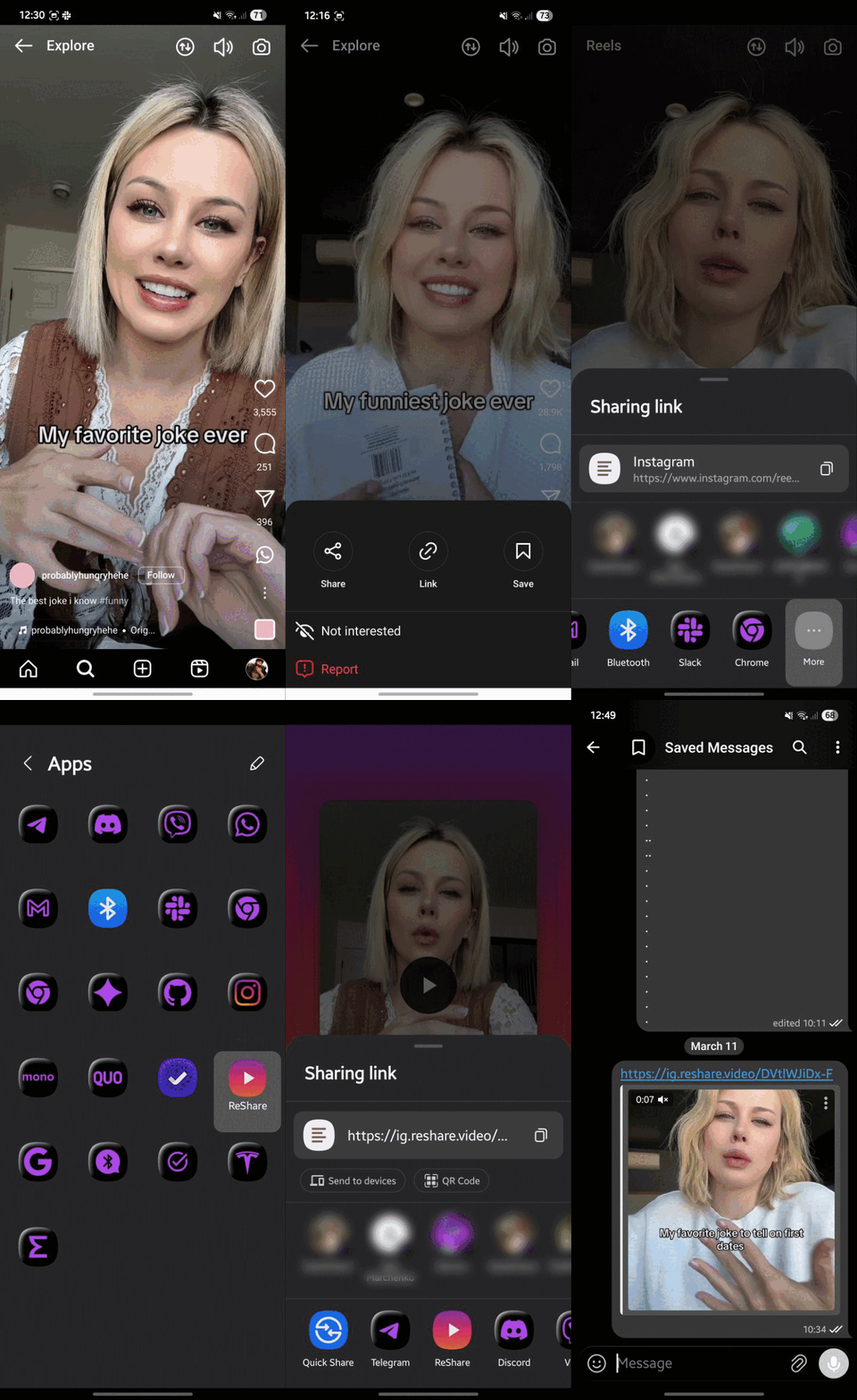
Android — 2 taps
- Open reshare.video in Chrome, tap menu → Add to Home screen → Install (once)
- In Facebook, open the video → Share → ReShare
- Tap Share again → Telegram → pick the chat
iPhone
- Add the ReShare Shortcut
- Open the video → Share → More → ReShare
- Choose Telegram
Desktop
Drag the ReShare bookmarklet from the homepage to your bookmarks bar, then click it on any Facebook video page to get a direct link you can paste into Telegram Desktop.
Questions
Can I extract from a private group or friends-only post?
No. Only publicly viewable videos work. Anything behind a login isn't reachable, and ReShare never asks for your Facebook credentials.
Do fb.watch links work?
Yes. The redirect is followed automatically before extraction — you can paste the short link as-is.
What about Facebook Reels specifically?
Supported. facebook.com/reel/… is handled the same as any other video URL.
How long does the extracted link last?
Facebook's CDN links are time-limited and expire after a few hours — fine for a chat message. For something permanent, use Download to device and send the file itself.